From RAW to ready to share.
In minutes.
RevelRaw is a native Mac RAW photo editor, no subscription required. Open 24 camera RAW formats, start from AI-ranked presets, and sync your edits across the shoot. Photos stay on your Mac, with no RevelRaw account.

Edit and compare unlimited photos free. Includes one full-quality export. Lifetime purchase available.
macOS 26 or later · Apple M1 or later
Find a look that fits your photo.
RevelRaw recognizes your scene and ranks 40+ presets to give you a starting point. Preview film-inspired color, cinematic tones or black and white, then fine-tune the look to make it yours.
Change just part of your photo.
Brighten a face, soften a background or bring out the sky. Selective edits let you adjust light, color and detail exactly where you want them.
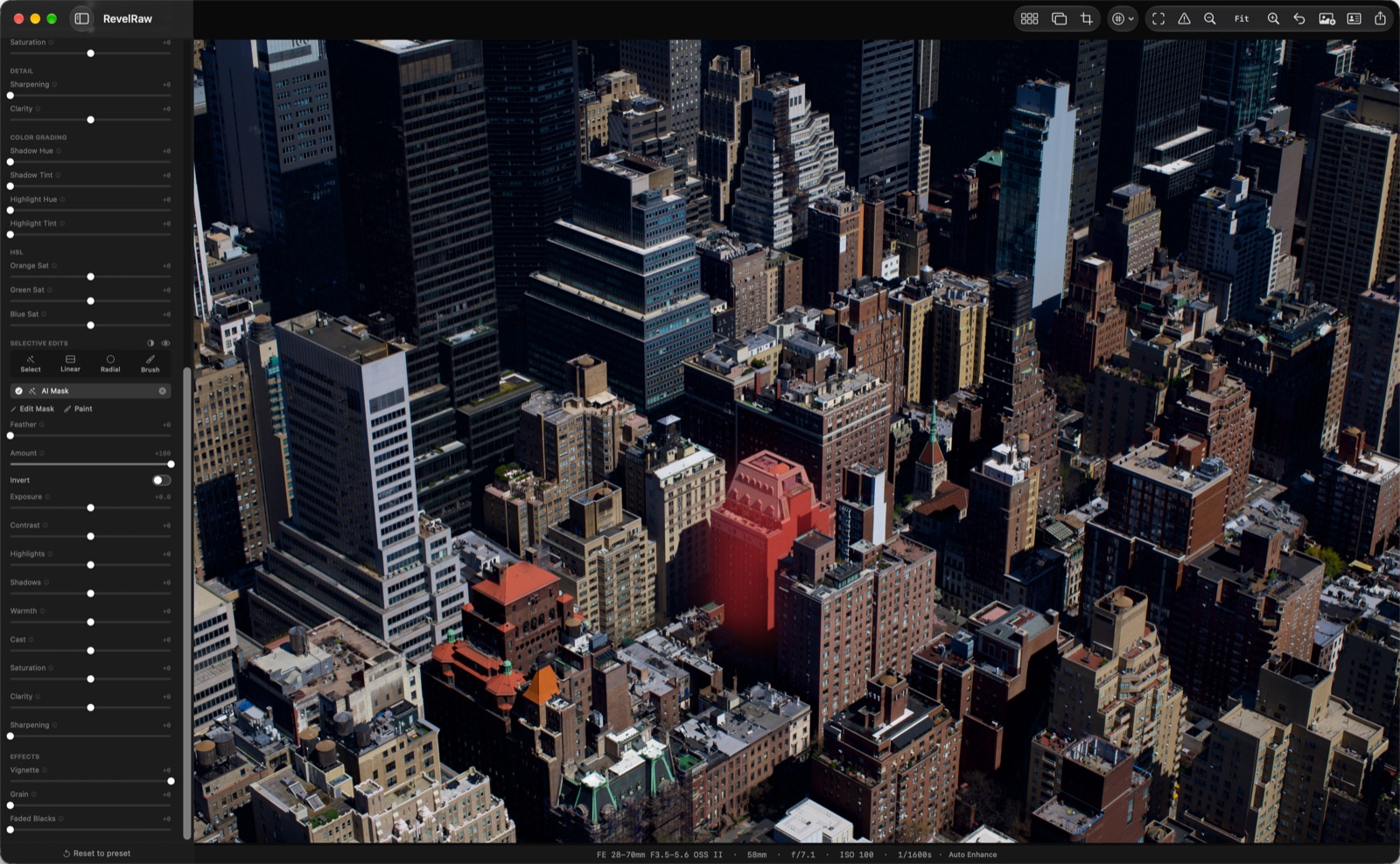
- Click to select
- Click a face, the sky or the background to select it. Requires macOS 27; Apple’s selection model downloads on first use, then runs on your Mac.
- Gradients and brush
- Darken a sky with a linear gradient, lift a subject with a radial gradient, or paint a mask with the brush. Works on macOS 26 and later.
- Refine each area
- Use up to three layers per photo, each with its own light and color controls. Soften edges, change the amount or invert the selection.
- Carry edits across a series
- Sync, Copy and Paste gradient and brush layers across compatible photos. AI selections stay with the original photo.
One look. Across your whole shoot.
Get the color right on one photo, then carry selected settings across the rest. Give a trip, a portrait session or a weekend’s photos a consistent feel.
Sync and batch editing are free. Undo the whole batch in one step.
-
Open your photos together. Drop in a group of RAW files or open a folder. Browse your photos in the filmstrip and arrange them in your own order.
-
Sync the settings you choose. Sync your look, white balance, denoise and other selected settings. Keep control over what changes.
-
Export the set with Pro. Save selected photos or the whole shoot to a folder in one pass, ready to share or print.
Bring out the detail. Get the color right.
Start with Auto white balance, fine-tune in Kelvin, and return to As Shot whenever you like. Lift shadows, tame highlights and shape contrast with RGB tone curves. Compare with the original as you edit.

Export for your feed, portfolio or print.
Choose an export preset for Instagram, your portfolio, stock sites or print. Set the format, size and color space together, and include your name and copyright in the file.
- Instagram JPEG · 1080 × 1350 · sRGB · 90%
- 500px JPEG · 2048 × 2560 · sRGB · 95%
- Adobe Stock JPEG · Full · sRGB · 100%
- Print TIFF 16-bit · Full · Adobe RGB
- Web HEIF · 2400 long · P3 · 85%
Try it on a photo you have been meaning to edit.
Choose a look, make your adjustments and keep the result. Your first full-quality export is free.
“RevelRaw does everything locally, with no account and no internet. The AI scene detection is genuinely useful, and the AI denoise saved several high-ISO photos from a wedding last week.”
“It was better than I expected. For editing something quickly, it’s a very good app.”
“The AI helped me remove the noise from my photos.”
Clean up the grain in the shots worth keeping.
Reduce luminance and color noise with AI denoise, then set the strength to keep the texture you want. Process the full-resolution photo on your Mac. Drag the comparison to inspect the detail.
Keep the look you chose in-camera.
RevelRaw reads the Sony Creative Look recorded in your ARW and applies it when you open the photo. Start with the FL, VV or other supported look you shot, then refine it with the editing controls.
Edit wherever you take your Mac.
Open, edit and export without an internet connection or a RevelRaw account. Your photographs and edits stay on your Mac, and AI scene detection and denoise run there too.

Bring the RAW files you already shoot.
Open 24 RAW formats, from Canon CR3, Nikon NEF, Sony ARW and Fujifilm RAF to DNG and iPhone ProRAW. Check supported RAW formats, then try one of your own files. Just need to look at a file first? See how to open RAW files on a Mac with nothing installed.
See the workspace before you download.
Explore the preset library, color controls, before-and-after comparison and export options in RevelRaw for Mac. Open any screenshot for a closer look.


Edit free. Your first export is on us.
Edit as many photos as you like. To export more than one, choose any plan below.
- Unlimited full-resolution exports, no watermark
- Batch export a whole shoot, or just your selection
Prices shown in USD. Download free and choose a paid plan inside the app. Apple handles payment. Monthly and yearly subscriptions auto-renew until you cancel in System Settings; lifetime is a one-time purchase.
Before you download
What can I try for free?
Open, edit and compare unlimited photos for free, including syncing edits across a shoot. One full-quality single-photo export is included. Pro unlocks unlimited exports and batch export.
Will it work on my Mac?
You need macOS 26 or later and a Mac with an Apple M1 chip or later. RevelRaw is available in English, Spanish, Japanese, German, French and Portuguese. Check the current requirements on the Mac App Store before downloading.
Can I open files from my camera?
RevelRaw opens 24 RAW formats, including Canon CR3, CR2 and CRW; Nikon NEF and NRW; Sony ARW, SR2 and SRF; Fujifilm RAF; Panasonic RW2; Olympus ORF; and DNG, including iPhone ProRAW. See the supported formats and use the free export to try your own file.
Do I need editing experience?
You can start with a suggested preset and export, or refine the result with exposure, color, detail and crop controls. Preview your changes, compare with the original and use undo to explore different edits.
Do my photos get uploaded?
Opening, editing, AI processing and exporting happen on your Mac. You do not need a RevelRaw account. You need internet access to download the app or buy Pro through the App Store.
Do I have to subscribe?
No. You can buy lifetime access with a single payment, or choose a monthly or yearly subscription. Editing is free, and so is your first export. All Pro plans include unlimited exports and batch export. See the plans above; prices vary by App Store region.
Can I export for social media and print?
Yes. Export as JPEG, PNG, TIFF or HEIF, with presets for social media, stock sites, print and web. Set the dimensions, quality and color space for your destination, and add copyright and other metadata to the file.
Can I edit a whole shoot at once?
Yes. Open a folder or multiple RAW files, refine one photo, then Sync, Copy or Paste selected settings across the others. Batch editing is free and can be undone in one step. Pro adds batch export of your selection or the whole shoot.
Can I edit just part of a photo?
Yes. Masks are free, with no Pro required. Use linear gradients, radial gradients and a brush on macOS 26 or later. Click-to-select requires macOS 27 and downloads Apple’s on-device selection model on first use. Each photo supports up to three layers with separate light and color controls. Gradient and brush layers can be synced across compatible photos; AI selections are not copied.
Can I bring my Lightroom presets and edits?
Import compatible Lightroom .xmp presets and .cube color LUTs. Supported Lightroom adjustments can also be read from a DNG or an accessible XMP sidecar beside your RAW file, including its crop and straighten angle. Adobe profiles and masks are not imported, and rendering can differ. This does not import your Lightroom catalog.
Make your first RAW edit with RevelRaw.
Take one of your own photos from a suggested look to a finished export. Try the workflow before choosing a paid plan.