Edit Nikon NRW files on your Mac.
Coolpix RAW, fully developed.
RevelRaw is a native macOS RAW editor. Drop an .NRW from your Nikon Coolpix, and the app reads the scene, ranks 50+ curated presets, and lets you fine-tune, compare and export, all on your Mac.
Preview your RAW and check compatibility
Your photo stays in your browser. An embedded preview does not confirm full RAW decoding.
The preview could not load. You can still download RevelRaw directly or try again later.

Free editing. One full-quality export included. Lifetime purchase available.
macOS 26 or later · Apple M1 or later · 4.8 on the Mac App Store
About the NRW format
NRW is the RAW format Nikon's advanced Coolpix compacts write, from the P6000 in 2008 to superzooms like the P950 and P1000. It is related to NEF but not the same file, and RevelRaw opens it directly, so you can develop Coolpix photos on your Mac without converting them to DNG first.
- Cameras
- High-end Coolpix: P6000, the P7000 series, P330, P340, B700, P950, P1000, P1100 and A1000
- Introduced
- 2008, with the Coolpix P6000
- Opens in macOS Preview?
- Yes; every model above is on Apple's list
- File size, public samples
- 16–35 MB: 12-bit data, stored uncompressed on most models (P7000 16 MB, P1000 26.5 MB, A1000 35 MB)
Two things catch Coolpix shooters out. First, support: plenty of apps that handle NEF perfectly treat NRW as an afterthought, so a file can open in one editor and not the next. Second, size: most of these compacts store RAW uncompressed, so a 16-megapixel P1000 frame weighs about as much as a 24-megapixel DSLR NEF. RevelRaw opens all 12 NRW files in the PIXLS.US public archive.
Related guides
Change just part of your photo.
Brighten a face or bring out the sky. Adjust light, color and detail in just the area you choose.
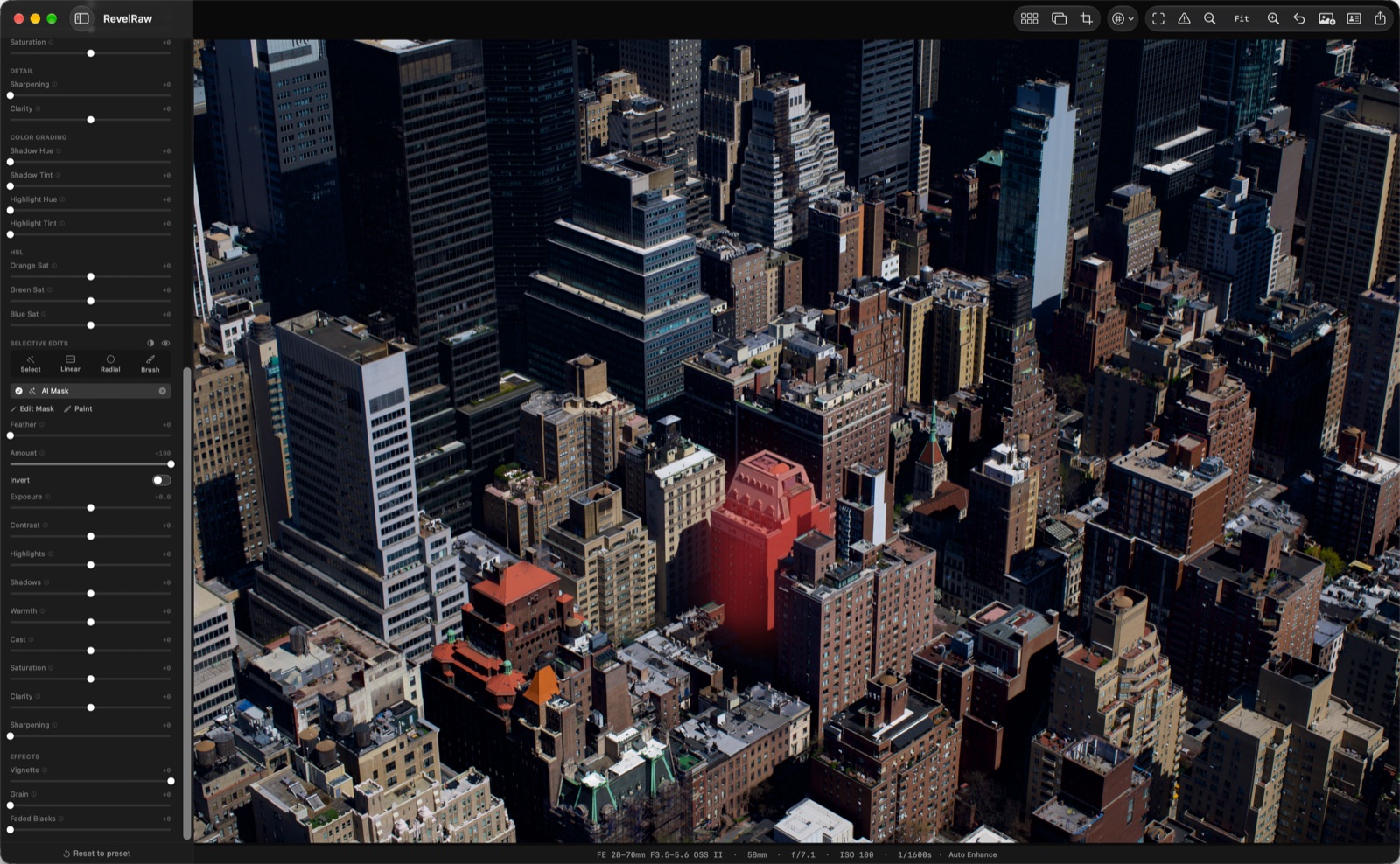
- Click to select
- Select a face, sky or background with a click. Requires macOS 27 and a one-time model download.
- Gradients and brush
- Use linear or radial gradients, or paint with a brush. Works on macOS 26 and later.
- Refine each area
- Up to 16 mask layers per photo. Adjust each layer’s light, color, strength and edges.
- Carry edits across a series
- Sync gradient and brush masks across compatible photos. AI selections stay with the original.
Bring out the detail. Get the color right.
Recover highlights, lift shadows and cut through haze. Fine-tune white balance, eight HSL color bands and RGB curves, then compare with your original.

Export for your feed, portfolio or print.
Export presets set the format, size and color space for you. Choose social, web or print, and add your name and copyright.
- Social · Portrait JPEG · 1350 px
- Social · Square JPEG · 1080 px
- Stock Submission TIFF · Full
- Print TIFF 16-bit · Full · P3
- Web JPEG · 2048 px
What photographers say.
Real reviews from the Mac App Store.
4.8 ★★★★★
Mac App Store rating
Read all reviews on the App Store“This app is very fast and easy to use to get great results. The program feels very polished—powerful but not overly cluttered. I appreciate the ability to use the app offline and the option to buy once cry once. Worth every penny.”
“It was better than I expected. For editing something quickly, it’s a very good app.”
“RevelRaw does everything locally, with no account and no internet. The AI scene detection is genuinely useful, and the AI denoise saved several high-ISO photos from a wedding last week.”
Less noise. Keep the detail.
Reduce noise with AI denoise at full resolution, right on your Mac. Adjust the strength to keep the texture you want. Drag to compare.
Bring the RAW files you already shoot.
Open 24 RAW formats, including Canon, Nikon, Sony, Fujifilm and iPhone ProRAW. Check supported RAW formats, or see how to open RAW files on a Mac.
Edit free. Your first export is on us.
Edit as many photos as you like. To export more than one, choose any plan below.
- Unlimited full-resolution exports, no watermark
- Batch export a whole shoot, or just your selection
Prices shown in USD. Download free and choose a paid plan inside the app. Apple handles payment. Monthly and yearly subscriptions auto-renew until you cancel in System Settings; lifetime is a one-time purchase.
Before you download
Can RevelRaw open NRW files?
Yes. Drag a .NRW into RevelRaw or pick it from File > Open — AI scene detection, all 50+ presets and every fine-tune control work on it, and exports go out as JPEG, PNG, TIFF or HEIF. Curious what's inside an NRW file? Read our NRW guide.
Which cameras does RevelRaw support?
Nikon's advanced Coolpix compacts, from the P6000 to the P1100 and A1000, and every Nikon DSLR and Z body through NEF. RevelRaw also opens RAW from Sony, Canon, Fujifilm, Panasonic, OM System and the other major brands. See every format RevelRaw opens.
How much does RevelRaw cost?
RevelRaw is free to download, editing is free, and your first export is free so you can try the whole workflow. After that, RevelRaw Pro gives you unlimited exports and batch export for $3.99/month, $24.99/year (about $2.08 a month), or $94.99 once for lifetime access. You buy inside the app through your Apple Account, and monthly or yearly plans can be canceled anytime.
What is RevelRaw?
RevelRaw is a Mac app for editing RAW photos. Open an Nikon .NRW file and RevelRaw recognizes what's in the shot, suggests the best-matched looks from its 50+ presets, and lets you fine-tune and export, all on your Mac.
Why are my Coolpix NRW files so large?
Most NRW-writing Coolpix models save 12-bit RAW uncompressed. In public sample files a P1000 NRW weighed 26.5 MB and an A1000 35 MB, about the size of a lossless NEF from a Nikon D7500 DSLR.
Do I need to convert NRW to DNG to edit it?
Not for RevelRaw: drag the NRW in and it opens like any other RAW. Adobe's free DNG Converter is only worth it if another app in your workflow refuses the file, and then keep the original NRW as your negative.
What can I try for free?
Edit and compare unlimited photos, including masks and batch editing, free. One full-quality export is included. Pro adds unlimited exports and batch export.
Will it work on my Mac?
You need macOS 26 or later and an Apple M1 chip or later. The app supports English, Spanish, Japanese, German, French, Italian and Portuguese.
Do I need editing experience?
No. Start with a suggested preset, adjust it to taste and compare with the original. You can undo your changes.
Does RevelRaw have film looks and HSL?
Yes. Film looks, eight-band HSL, RGB curves, Structure and Dehaze are free. Pro adds unlimited exports and batch export.
Does RevelRaw upload my photos or use them to train AI?
Photo editing and AI processing happen locally on your Mac. We do not use your photos to train AI models. Your photos are not uploaded for editing, AI processing or export, and no RevelRaw account is required. Internet is needed to download the app, buy Pro and download macOS 27 selection models once.
Does the RevelRaw website use analytics or advertising?
Optional website analytics and advertising measurement are enabled by default in the United States and Mexico. Elsewhere, they stay off until you enable them. Open Privacy choices in the footer to change your settings at any time. Your saved choices take priority, and Global Privacy Control disables all optional tracking. Read our Privacy Policy or open Privacy choices.
Can I export for social media and print?
Yes. Export JPEG, PNG, TIFF, HEIF or linear DNG with edits applied. Choose size and color space, add copyright, and remove location data.
Can I edit a whole shoot at once?
Yes. Sync selected settings across your photos, free, with one-step undo. Pro adds batch export of your selection or the whole shoot.
Can I edit just part of a photo?
Yes, and masks don’t need Pro. Use gradients and a brush on macOS 26+. Click-to-select needs macOS 27 and a one-time model download. Use up to 16 mask layers per photo; only gradient and brush masks sync across photos.
Can I bring my Lightroom presets and edits?
Import compatible .xmp presets, 3D .cube LUTs and supported edits from DNG or XMP sidecars. Profiles and masks aren’t imported; results may differ. Lightroom Classic catalog import brings ratings, picks and rejects, color labels, keywords and captions into your open shoot, without changing the catalog; develop edits and collections stay there.
What doesn’t RevelRaw do?
RevelRaw is Mac only: there is no Windows, iPhone or iPad version. It has mask layers but no pixel layers. It has no catalog, cloud sync, tethering, plug-ins or video editing. HDR, panoramas, focus stacking, generative fill, automatic object removal, perspective correction, printing and soft proofing aren’t included.
From .NRW to finished photograph, in minutes.
Find your look. Save your first photo free.