HEIF vs JPEG Image Quality at the Same Size (2026)
What does the same photo look like at the same file size?
Look at the narrow windows on the sunlit building. In the JPEG crop, little patches of color break up the pale stone between windows. In the HEIC, the vertical dividers are easier to follow. Both files preserve the outline of the rooftop.
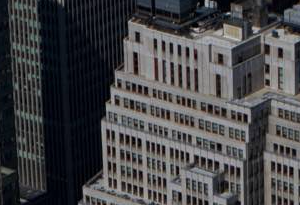
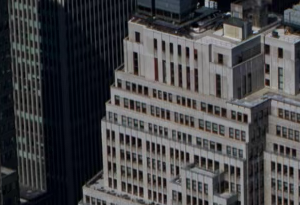
The byte counts are for the full exports. We rendered the site’s Sony RAW sample (41 MB) once, then used the same 1600 × 1066, 8-bit sRGB image for both files. In the Mac’s built-in sips encoder on macOS 27.2.1, JPEG quality 42 and HEIC quality 59 landed 490 bytes apart, about 0.2%. We decoded each export and cut the same 300 × 205 pixels from it. The crops on this page use lossless WebP so they can be viewed side by side in a browser.
This frame is full of repeating lines. A low-light portrait presents a different challenge. Compare the texture of eyelashes against skin and check whether smoothing has erased strands of hair. For a landscape, inspect leaves against sky and look for bands in a smooth gradient.
How much smaller is HEIC at comparable quality?
That question calls for a different test. The HEIC.fyi comparison encoded 25 photographs and matched a perceptual score called SSIMULACRA2. Against JPEG quality 85, the median HEIC used 82% of the bytes, an 18% saving. HEIC was smaller on 23 of the 25 photos. Against JPEG quality 60, the median saving rose to 42%. Those figures measure storage at the chosen score. Our building crops show what a fixed byte budget buys on one frame.
The choice of score also matters. Suman Kunwar’s independent image-quality evaluation on PREreview is a preprint that compares formats using measures including pixel error and structural similarity. A score summarizes a whole frame. When delivering a portrait, you may care more about what happened to the eyes than about a change spread across the background.
Everyday JPEG and HEIC exports both discard some information. Keep the original RAW and editing settings if you want to revisit the photograph. Our guide to lossless photo formats covers master files for further retouching.
Will HEIF keep smoother skies, richer color or brighter highlights?
Those are three different properties. Bit depth determines the number of code values available per channel. An 8-bit file has 256, and a 10-bit file has 1,024. Canon's image-file guide describes cameras that can record 10-bit HEIF. Both files in our crop test were 8-bit, so extra bit depth cannot explain the difference in the windows.
Color space determines which colors those values represent. A Display P3 export can carry saturated colors outside sRGB. A correctly tagged JPEG can carry Display P3 too. For the difference between cinema P3 and Display P3, see the DCI-P3 vs sRGB guide.
HDR affects how bright highlights can appear on a compatible display. Some photos carry a gain map, an additional image that tells the viewer how to brighten parts of the base picture. The IDRsolutions HEIC vs JPEG comparison describes how a converter can drop that map. If the highlights change after sharing, compare the received file with the original on the same HDR display.
Which file should you send?
- Web gallery, social post or email to a client. An sRGB JPEG is widely supported. Size it for the gallery or upload slot. The Instagram export settings guide covers feed dimensions and resizing.
- Private collection on compatible devices. HEIC can save space. Send one file the way you normally share a shoot and check the format of the copy that arrives. Apple’s HEIF sharing guide explains when its software can convert a photo to JPEG for the recipient.
- Print lab or stock agency. Follow the recipient’s specifications for format, pixel dimensions and profile. A lab requesting an sRGB JPEG can print from that file. A retoucher requesting a 16-bit TIFF needs the additional precision for the next round of adjustments.
How can I run the comparison on my Mac?
- Finish one edit and save a lossless master. Open that master in Preview and choose File > Export. Make a JPEG at your normal delivery setting. Record the byte count in Finder’s Get Info window.
- Export the same master as HEIC. Keep the pixel dimensions and profile fixed, then adjust quality until the file sizes are close. Matching the two quality sliders by number gives each encoder a different byte budget.
- Compare at 100%, then at the size your client will see. Send both files through the intended gallery or messaging app, download them and compare again. Check the received format, color and any copyright or location metadata that matters to you.
If you need other editing controls, this roundup can help you find a Mac alternative to Photos. Our app, RevelRaw, exports JPEG and HEIF from the same RAW edit. Editing and the first full-quality export are free on macOS 26 or later with Apple M1 or later. Get RevelRaw on the Mac App Store.
Frequently asked questions
Are HEIF and HEIC the same thing?
HEIF is a container format for images. A .heic file commonly holds a still picture compressed with HEVC. In this comparison, HEIC is the kind of HEIF file we tested.
Does HEIC save half the space of a JPEG?
The saving depends on the picture, encoder and quality target. In a 25-photo test, HEIC used a median of 82% of the JPEG bytes at one perceptually matched quality target. On two of those photos the HEIC was larger.
Does converting an existing JPEG to HEIC improve it?
Detail discarded by the JPEG encoder is already gone. A lossy HEIC conversion can introduce more artifacts. When you have the RAW file, make each delivery copy from that original edit.
Is every HEIF photo 10-bit or HDR?
HEIF can hold an 8-bit image, a higher-bit-depth image or an image with extra HDR information. Check the exported file and open it on the intended display. Its extension alone tells you little about the highlights you will see.
Which format should I send to a print lab?
Follow the lab’s upload instructions. If it asks for an sRGB JPEG, export that directly from your finished edit at the requested dimensions. If it asks for a 16-bit TIFF and a particular profile, supply those instead.